DORKK JOURNAL Exam Preparation
Past Exam Papers: How to Find and Use dorKk’s Free Tool
Find South African past exam papers and memoranda for Grades 10–12 with dorKk. Follow a screenshot guide, worked examples and a practical revision routine.
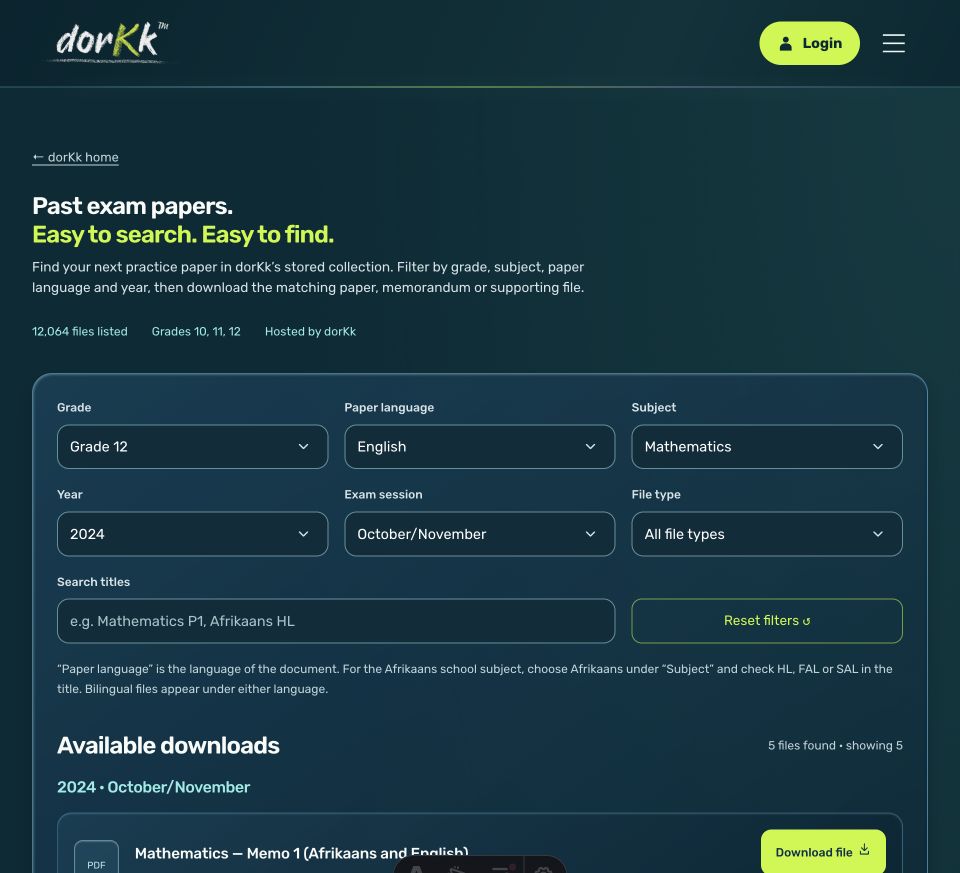
Check the collection before following the walkthrough
Grade 10 and Grade 11 files currently span 2015–2018. Grade 12 has a wider archive; a year listing does not guarantee all subjects, sessions or memoranda. Use the current finder and the linked static year collections as the authoritative navigation if screenshots differ from the interface.
Before saving a document, match grade, subject, year, session, language and paper number. Find the corresponding memorandum separately and confirm its label; do not assume the next file in the list is its match.
dorKk’s Past Exam Papers tool is a free website finder for South African examination papers, memoranda and supporting files for Grades 10, 11 and 12. Choose your grade, paper language, subject, year and examination session, then open the matching download. You can also share your filtered search with a learner, parent, teacher or study group.
Its value is straightforward: spend less of your revision session looking for resources and more of it practising. Instead of searching separately for a Mathematics question paper, its memorandum and an answer book, you can bring the available files into one focused results list.
This guide explains how the finder works, what its collection includes and how to turn a downloaded paper into useful exam preparation. The screenshots show the website tool on 30 October 2026; the study scenarios are illustrative examples.
What is the dorKk Past Exam Papers tool?
The Past Exam Papers finder organises dorKk’s stored examination collection into searchable downloads. It provides filters for grade, document language, subject, year, exam session and file type, together with a title search. Results identify the document and offer a Download file action.
The collection checked on 29 October 2026 contains 12,064 indexed files, spanning 2008–2026 across the collection. These are file counts, including supporting documents, rather than 12,064 distinct question papers. Grade 12 accounts for 11,950 files, while Grade 10 has 58 and Grade 11 has 56.
Coverage therefore varies substantially. A listed grade does not imply every subject, year or session is available. Use the filters to see the actual options for your chosen collection. Older papers may also reflect a different assessment scope, so check your teacher’s current guidance before treating them as a revision checklist.
Why use a past-paper finder for exam preparation?
Finding a paper is only the beginning. The practical benefit comes from choosing suitable material, attempting it independently and using the memorandum to decide what to revise next.
Find relevant resources with fewer separate searches
A broad search for “matric Mathematics papers” can leave you comparing documents from different years or sessions. dorKk lets you narrow those choices on one page. Select Grade 12, Mathematics, English and a year, then check the session and document title before opening anything.
This gives a study session a clearer starting point. You can identify the question paper you intend to attempt and look for its supporting files before setting your timer. The finder handles resource discovery; you remain responsible for checking that the selected material matches your schoolwork.
Practise answering, rather than only reading
A past paper gives you something concrete to do: interpret instructions, choose an approach and write an answer. Working without the memorandum beside you makes it easier to see which steps you can complete independently and where you need help.
For example, recognising a worked algebra solution is different from producing the next line yourself. Attempting the question first reveals that difference. You can then use the marking guidance to investigate the error instead of rereading an entire chapter without a clear target.
Make revision more specific
A completed attempt creates evidence. Perhaps you know the formula but substitute incorrectly, miss a command word or stop before giving a final unit. Each problem suggests a different next action.
Keep a short error record: the question, what went wrong and what you will practise. This makes a follow-up session easier to plan. The finder does not mark your answers or diagnose weaknesses automatically; it supplies documents you can use for that process.
How do you find and download a past exam paper?
Open dorKk Past Exam Papers. The interactive finder starts with Grade 12 selected. Change that selection if you need another available grade, then work through the filters below.
- Choose Grade. Select Grade 10, 11 or 12. Available subjects and other options depend on the collection.
- Choose Paper language. Select the language of the document you want to read, or leave all languages available.
- Choose Subject. Select the school subject, such as Mathematics. Mathematics and Mathematical Literacy are separate choices.
- Choose Year. Pick a year available for your selected subject and language.
- Choose Exam session. Narrow the results to the required sitting, such as October/November, where available.
- Choose File type. Select a question paper, memorandum or another available document type, or keep all types visible.
- Check and open the result. Read its title and details, then select Download file.
The file opens in a new tab. Depending on your browser and the document, it may download immediately or open for saving. Use the browser’s save or download control if needed. The Official source link provides the original Department of Basic Education listing for reference; the download itself comes from dorKk’s stored collection.
Worked example: Grade 12 Mathematics papers and memoranda
Suppose you want to practise Grade 12 Mathematics Paper 1 in English from the October/November 2024 examination. Use this filtered Mathematics search, which matches the screenshots.
With all file types selected, the checked collection returns five files: Paper 1, Paper 2, Memo 1, Memo 2 and a Paper 2 answer book. The memoranda and answer book are bilingual, so they remain visible when English is selected.
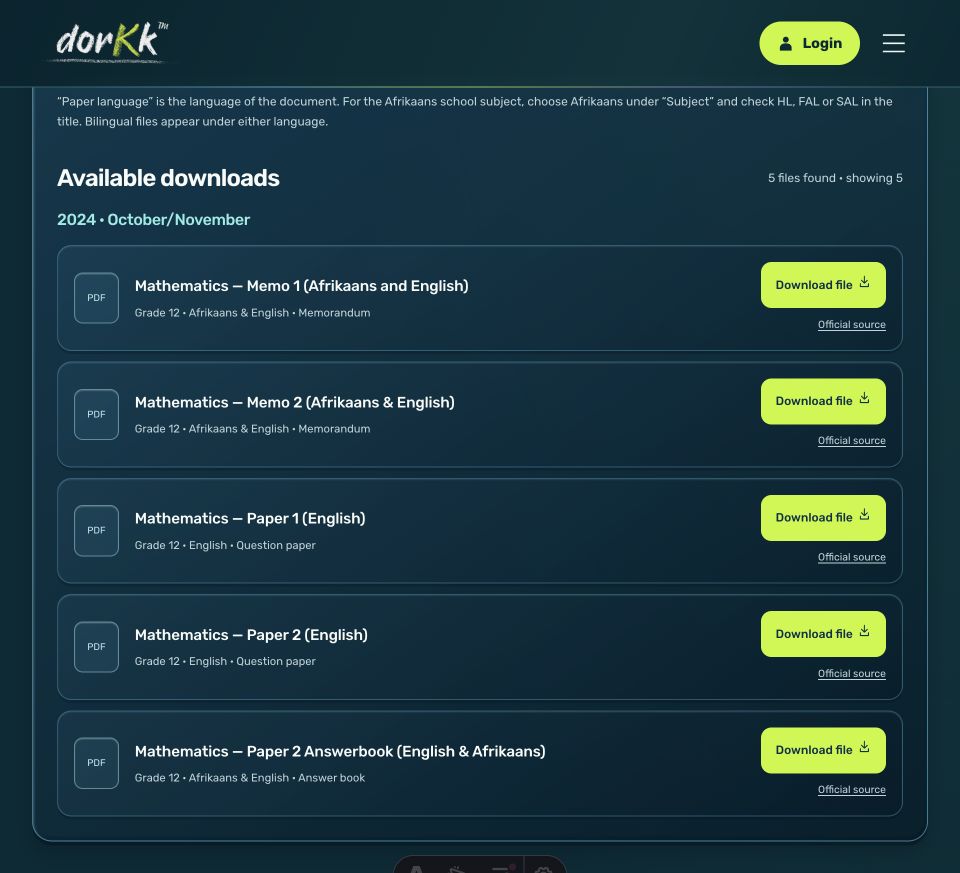
Open Mathematics — Paper 1 (English) and save it. Find Memo 1 (Afrikaans and English) in the same session, then confirm the identifying information inside both documents. Keep the memorandum closed during your first attempt.
If you switch to Paper 2, check its own memorandum and any required supporting material. A nearby download is not automatically the correct companion file. Matching the subject alone is insufficient: grade, year, session and paper number must agree.
This example demonstrates the finder’s main advantage. You can see the available documents together, make a deliberate selection and begin a focused practice session.
How do paper language, subject and title search differ?
Paper language describes the document’s language; Subject describes the school subject. To find an Afrikaans subject examination, choose Afrikaans under Subject and check whether the title identifies Home Language, First Additional Language or Second Additional Language, often abbreviated HL, FAL and SAL.
Selecting Afrikaans as the paper language alone can also return other subjects written in Afrikaans. Similarly, selecting English does not mean you have chosen English as a school subject. This distinction matters when a learner studies several subjects in the same teaching language.
Use Search titles to narrow the results further. Try wording that appears in the listed titles, such as “Paper 1” or “Memo 1”. The search works with the selected filters; it does not search inside the downloaded PDFs. If results disappear, clear the search text before changing several other settings.
How should you use a past paper to improve revision?
Use a repeatable sequence: attempt, check, repair and retry. The following routine is a practical example you can adapt to your timetable and teacher’s instructions.
Attempt a manageable task independently
Decide whether you are practising a topic, a section or a full examination. Early in revision, one relevant question may be enough. For a full timed attempt, follow the duration and instructions printed on the paper, and gather permitted equipment before starting.
Write your working even when you are uncertain. A blank answer reveals little about where understanding broke down. An incomplete calculation or paragraph gives you something specific to discuss afterwards.
Check the method as well as the answer
Open the matching memorandum after your attempt. Compare the required steps, terminology and reasoning with your own response. A correct final number does not explain whether your method was sound; an incorrect number may come from one identifiable mistake.
For example, imagine you write a correct equation but lose a negative sign during simplification. Record “sign error during simplification”, then practise that operation. Avoid turning one error into the vague conclusion that you cannot do Mathematics.
Repair the gap and retry later
Review the relevant explanation, ask a teacher about the first confusing step or use a suitable subject guide. Then attempt a similar question without copying the solution. Return to the original difficulty in a later session to check whether you can now handle it independently.
For planning help, use dorKk’s exam preparation guide. Keep the paper, your working and your corrections together so the next session starts with evidence rather than guesswork.
How can parents, teachers and study groups use the tool?
Parents can help with organisation without needing to teach every subject. Agree on a realistic practice task, help locate the correct documents and ask the learner to explain one correction afterwards. “Which step will you change next time?” is more useful than checking only the final mark.
Teachers and tutors can share a filtered search for a particular grade, subject, year and session. Include the exact document title and question numbers in the instruction, because a results list may contain several files. For example: “Open Paper 1 (English), attempt the assigned question, and bring your working.”
Study groups can use the same search link to prepare independently before meeting. Each learner attempts the agreed questions first, then the group compares methods with the memorandum. This keeps discussion tied to actual work and makes unresolved questions easier to take back to a teacher.
The selected filters are saved in the page URL. Copy the address after filtering to share the search. It shares the resource selection, not a learner’s answers, marks or progress.
What if you cannot find the paper you need?
First clear the title search and broaden one filter at a time. Try all file types when looking for a memorandum, or another available year when the current combination returns no results. Reset filters clears the selections and returns to Grade 12.
If the interactive collection fails to load, use Try again or browse the Grade 10, Grade 11 and Grade 12 archives. Their grade and year pages provide listed downloads without depending on the interactive finder.
A missing result may reflect a coverage gap. Not every paper has a matching memorandum, and the smaller Grade 10 and 11 collections offer fewer choices. Contact dorKk about an incorrect or unavailable file with its grade, subject, year, session and title.
Frequently asked questions about dorKk past exam papers
Are the past exam papers free?
Yes. The public website finder and its listed downloads can be used without a paid dorKk app subscription. Internet and mobile data charges may apply when loading pages or downloading documents.
Does dorKk have Grade 10, Grade 11 and matric papers?
Yes, the checked collection includes all three grades. Grade 12 has substantially more files. Availability differs by subject, language, year and examination session, so inspect the results for your specific requirement.
Can I download question papers with answers?
You can download available memoranda separately from question papers. Check that the grade, subject, year, session and paper number match. A memorandum is not available for every question paper.
Can I save papers for offline practice?
Save the document using your browser’s download controls. Once saved successfully, the file can be opened offline with a compatible reader. Check that it opens before relying on it away from an internet connection.
Are older papers suitable for current exams?
They may provide useful practice, but assessment requirements can change. Compare the selected questions with your current scope and teacher’s guidance. The archive’s date range does not certify every document against the current curriculum.
Find your next practice paper
Choose one subject and one clear task. Open the Past Exam Papers tool, select your filters and check the document details. Save the matching memorandum where available, attempt the questions independently and use your corrections to plan the next session.
The value of dorKk’s finder is a shorter route from searching to purposeful practice. A well-chosen paper, an honest attempt and a specific correction give your revision a practical direction.